# I Built a Second Brain That Runs While I Sleep
## How I am finally getting my knowledge collection habit under control
There's a moment in every PKM journey where you stop adding plugins and start writing infrastructure. For me, that moment arrived when I realized my Obsidian vault had outgrown Obsidian.
Not the app itself. Obsidian is still the editor, the graph, the daily driver. But the *system* around it is Ansible playbooks, a VPS running background agents at 3am, a Telegram bot relaying Claude Code sessions to my phone, a local search engine indexing over a thousand documents, and git as the only database.
This is what happens when you treat a knowledge base as infrastructure instead of a hobby.
### TLDR
Two machines (Mac + VPS), one git repo, no database. Ansible deploys everything. Tailscale walls off the VPS with zero public ports. QMD indexes docs for semantic search in miliseconds Obsidian MCP gives Claude Code graph traversal over the vault. A Telegram bot bridges Claude Code sessions to my phone via tmux. Background agents pick up research tasks from a GitHub Issues queue every 30 minutes. 40+ Claude Code skills automate everything from filing notes to multi-agent research. Git is the only coordination layer.
## The topology
Two machines. One git repo. No database.
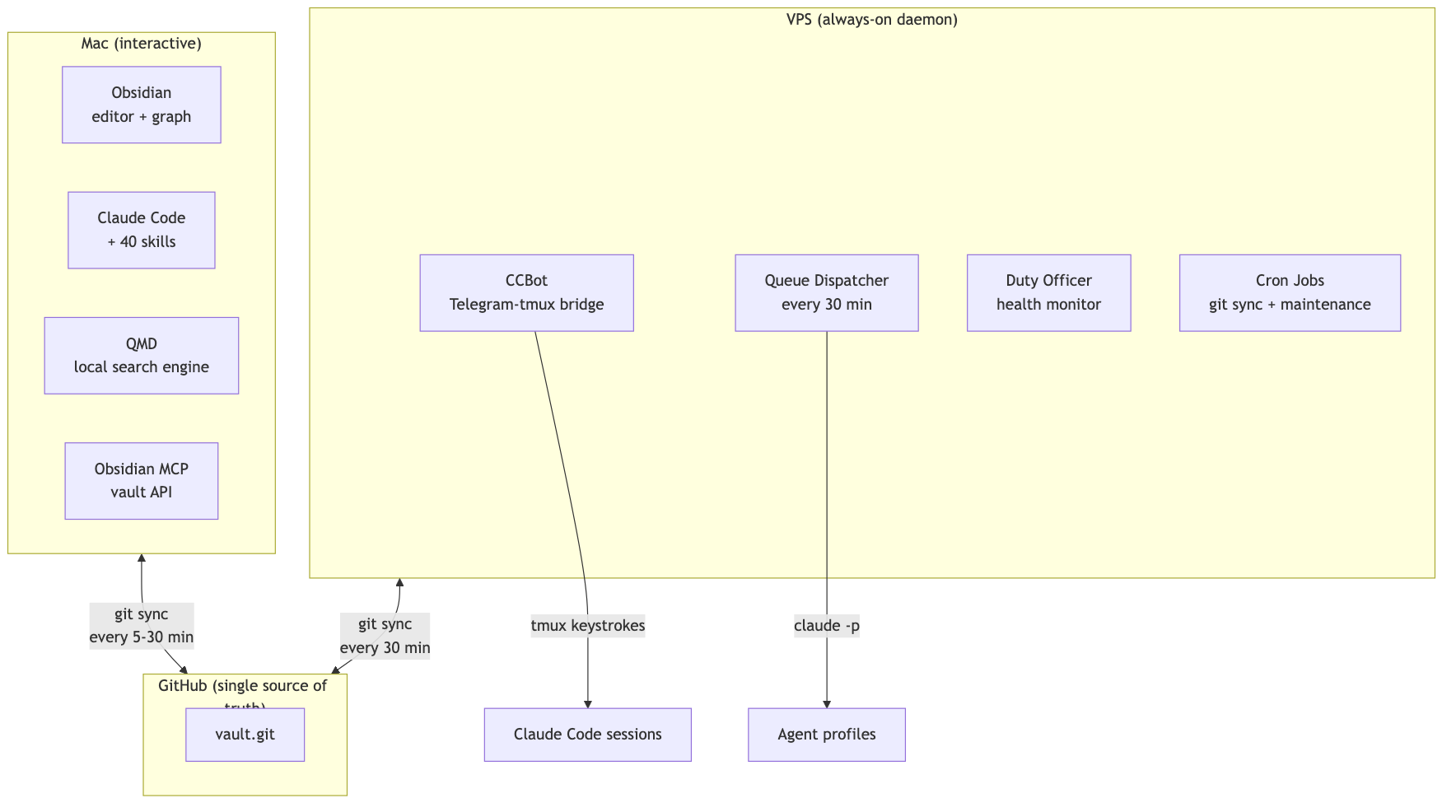
The Mac is where I think. Obsidian is open, Claude Code is in the terminal, and I'm writing and connecting ideas. The VPS is where the vault works while I don't. Background research, health monitoring, queue dispatch, all running without me.
They coordinate through git. That's it. No sync service, no real-time protocol. Just commits.
## Tailscale: the invisible network
The VPS has no public ports. None. No SSH on 22, no HTTP on 80 or 443, no anything. UFW allows exactly two things: Tailscale's WireGuard UDP port and traffic on the Tailscale interface itself.
```yaml
# The entire VPS firewall policy
ufw_rules:
- rule: allow
port: "41641"
proto: udp
comment: "Tailscale WireGuard"
- rule: allow
interface: tailscale0
direction: in
comment: "Tailscale interface"
```
Every connection between Mac and VPS runs over Tailscale's mesh. SSH, git sync, the Obsidian MCP bridge from VPS back to the Mac's Obsidian instance, the duty officer dashboard. If you're not on my tailnet, the VPS doesn't exist.
This is what makes the rest of the architecture possible. CCBot can run `claude --dangerously-skip-permissions` because the machine it runs on has no public attack surface. Background agents can write to the vault because the only way in is through my devices. The security model is "no ingress" rather than "careful ingress."
## Ansible: the boring part that makes everything work
Here's the thing about infrastructure that nobody wants to talk about: the setup is the product. If deploying to a new machine takes a day of fiddling, you don't have a system. You have a snowflake.
Everything is declared in Ansible group_vars:
```yaml
# Mac gets the full suite
mcp_servers:
qmd:
command: qmd
args: ["mcp"]
obsidian-mcp:
command: npx
args: ["-y", "mcp-remote", "https://127.0.0.1:3443/mcp"]
thoughtbox:
command: npx
args: ["-y", "@kastalien-research/thoughtbox"]
google-workspace:
command: uvx
args: ["workspace-mcp", "--single-user"]
# ... plus arxiv, semantic-scholar, markitdown
```
```yaml
# VPS gets a subset — no Google Workspace, different Obsidian MCP endpoint
mcp_servers:
obsidian-mcp:
command: npx
args: ["-y", "mcp-remote", "https://<vps-tailscale-ip>:3443/mcp"]
# research tools shared with Mac
```
One `ansible-playbook site.yml --limit mac` and the MCP servers, LaunchAgents, git repos, Homebrew packages, and Claude Code config are all in place. Secrets live in ansible-vault, never in dotfiles. The VPS gets its own subset with `--limit vps`.
Declare in YAML, deploy with Ansible, never hand-configure. If a machine dies tomorrow, I'm back up in an hour.
## QMD: when your vault gets too big for grep
At over a thousand documents, Obsidian's built-in search starts to sweat. You can feel it. The pause, the incomplete results, the way full-text search across a vault of research papers and session transcripts just lags.
QMD is a local search engine that sits alongside the vault. Three search modes:
- Keyword search (~30ms): BM25 ranking, exact phrase matching. The workhorse.
- Vector search (~2s): Semantic embeddings. Finds documents about the same *concept* even when they use different vocabulary.
- Deep search (~10s): Auto-expands your query into variations, runs both keyword and vector for each, reranks the combined results.
It's an MCP server, so Claude Code can search the vault mid-conversation:
```
me: "What did I write about forgetting curves?"
Claude: *searches QMD, finds 3 notes across Cognition/ and Research/*
```
The embedding pipeline runs as a LaunchAgent (`com.qmd-embed`), keeping vectors fresh as notes change. Two collections: `vault` (hundreds of massive docs) for the knowledge base, `sessions` (tens of thousands of turns between Claude and me) for Claude Code session transcripts, yes the full JSONL converted to markdown.
That session collection is the sleeper hit. I can ask "what did I figure out last Tuesday?" and get actual answers from my own thinking transcripts, not just the notes I remembered to write down.
## Obsidian MCP: giving Claude Code eyes into the graph
Obsidian MCP turns the vault into an API. Not just file reads. Graph traversal, search, structured editing.
Graph traversal means "start at this note, follow wikilinks 3 levels deep, show me what's connected." Claude Code uses this to understand context before making changes. There's TF-IDF ranked search with operators (`tag:infrastructure path:Research/`), which is faster than QMD for navigating known territory. And targeted editing: patch a specific heading, update frontmatter, append to a section, without reading and rewriting the whole file.
The connection between Mac and VPS is worth noting. On the Mac, Obsidian MCP talks to `localhost:3443`, directly to the running Obsidian instance. On the VPS, it reaches back across Tailscale to the Mac's Obsidian instance. Same vault, same API, different continent.
## CCBot: Claude Code in your pocket
This one took three tries.
First: Matrix server with a Maubot plugin. Heavy. Element X's encryption ceremony was painful, iOS clients were limited, and running Synapse for a text relay felt absurd.
Second: XMPP with Prosody. Five independent failure modes. Tailscale IP races, TLS config, two-service ordering dependency, credential sync between config dirs, slixmpp reconnection bugs. All for a text relay.
Third: Telegram bot + tmux. One process. It just works.
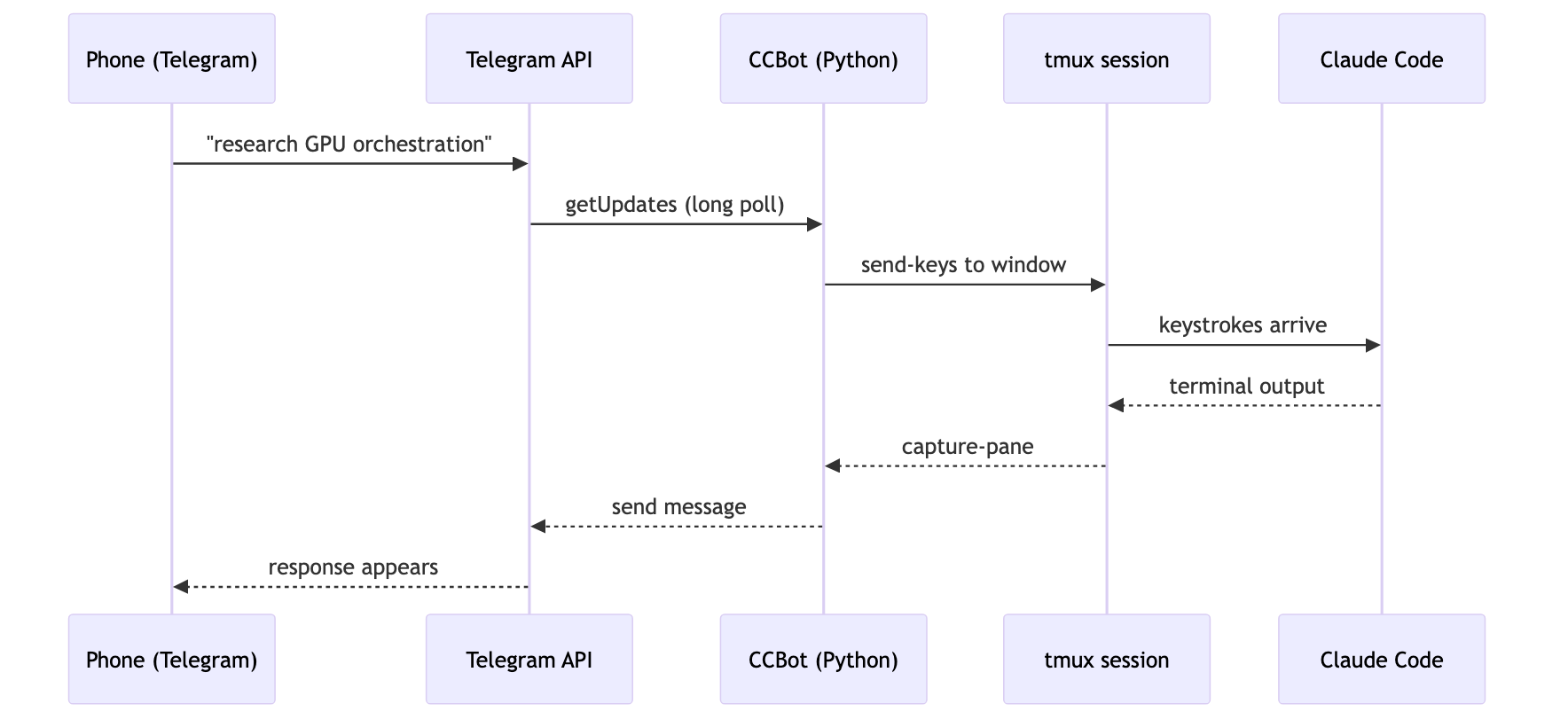
Each Telegram forum topic maps to a tmux window running `claude --dangerously-skip-permissions`. New topic, new Claude session. The terminal is the source of truth. You can `tmux attach` over SSH and pick up the same conversation.
The privacy tradeoff: Telegram sees message content in cleartext. I accepted this because the threat model is VPS access (protected by bot token + user ID allowlist), not message confidentiality. All connections are outbound. No webhooks, no public endpoints.
## The background agent queue
This is where it gets fun. I queue tasks from my Mac (or my phone via CCBot), and the VPS picks them up:

Agent profiles define what each type of task gets:
| Profile | Model | Budget | Purpose |
|---------|-------|--------|---------|
| research | Sonnet | $10 | ArXiv, Semantic Scholar, deep dives |
| editorial | Sonnet | $5 | Rewriting, consolidation, wiki-linking |
| maintenance | Haiku | $3 | Vault health, read-only audits |
| general | Sonnet | $5 | Everything else |
The dispatcher compares git hashes and only wakes the expensive runner when something actually changed. Tasks get three attempts before moving to a Failed section. Budget caps prevent runaway API costs.
From my phone, queuing a research task looks like:
```
me (in Telegram): /queue p2 research Find papers on executive function in transformer architectures
```
Two hours later, results land in `Agent/Results/`, committed to git, synced to my Mac, searchable in QMD.
## Skills: the Claude Code extension layer
Claude Code ships with tool use. Skills extend it with *workflows*. I have about 40, all in `~/.claude/skills/`.
Some favorites:
`/deep-research` orchestrates parallel searches across ArXiv, Semantic Scholar, and the web, then synthesizes findings with citations. `/recall` does unified cross-source search over vault notes and session transcripts in parallel, for when you vaguely remember "something about forgetting curves" but can't find it. `/atomize` takes a folder of documents and produces organized atomic notes with emergent themes. Drop a pile of PDFs, get a linked knowledge structure. `/daily-summary` pulls from three sources at end of day (vault changes via git, cross-machine Claude Code session transcripts, vault notes themselves) and writes a narrative journal entry. `/kanban-track` spins up a throwaway markdown kanban for multi-agent work, plus a durable GitHub issue as the after-action record.
Skills are global, version-controlled, and synced across machines via git.
## The vault manager: a librarian that never sleeps
Of all the skills, this one removed the most friction.
Every knowledge base has the same problem: filing. You write a note, and now you have to decide where it goes, what tags it gets, which MOC (map of content) it belongs to, whether the frontmatter is complete, and what other notes it should link to. Multiply that by hundreds of documents and the overhead adds up fast. Most of it isn't thinking. It's bookkeeping.
The vault manager is a dedicated agent that handles all of it. I write a note, dump it in `Inbox/`, and tell the vault manager to finalize it. It reads the vault's structural conventions from a config file, decides which domain folder the note belongs in, fills in the frontmatter (id, title, description, tags, `up` link to the parent MOC), updates the relevant MOC to include the new note, and adds crosslinks to related notes it finds through graph traversal.
It has two modes. For routine work (missing frontmatter, MOC updates, broken links), it acts autonomously and reports what it did. For judgment calls (ambiguous folder placement, tag decisions with multiple valid options, changes affecting more than ten files), it shows a plan and waits for confirmation.
The philosophy is strict: structure serves thinking. The vault manager edits metadata, never content. It catalogs and shelves. It does not rewrite.
Before I had this, I'd let notes pile up in Inbox for weeks because the filing overhead wasn't worth the interruption. Now the Inbox clears itself. An entire category of cognitive load, gone.
## Hooks: the nervous system
Claude Code hooks fire at lifecycle events. They're what makes passive context-loading work.
On session start: pull the latest `~/.claude/` config from git, load the constitution (10 principles that govern agent behavior), check for resume context from a previous session.
Before every message I send: inject today's date so the model doesn't hallucinate about 2024, remind it about available memory tools, auto-recall relevant vault context.
Before tool use: force the current year into web search queries, run a safety guard on bash commands.
The constitution deserves its own mention. It's a static file at `~/.constitution`, injected into every session. Ten principles. "Epistemic honesty above helpfulness." "Forgetting is a feature, not a bug." It lives outside Claude's management surface so no agent can rewrite its own belief system. Changes are rare and deliberate.
## Git as the only database
This is the decision that holds everything together: git is the only coordination layer.
No Postgres. No Redis. No sync service. Just commits and pulls.
The vault is a git repo. Both machines clone it. The Mac commits via Obsidian Git (every 5 minutes when open) and a LaunchAgent (every 30 minutes). The VPS commits via systemd timer (every 30 minutes) and after every pipeline run.
Conflict risk is low by design. Most files are one note per file, one index entry per file. The only shared mutable state is the queue (now GitHub Issues, previously a single markdown file), and the dispatcher always pulls before acting.
The payoff is a full audit trail for free. Every agent result, every vault change, all in git history. Need to undo a bad edit? `git revert`. Want to see what the vault looked like three months ago? `git log`.
## What I'd do differently
I hand-configured for months before writing Ansible playbooks. Every hour of hand-configuration is an hour of undocumented decisions that will bite you during the next machine migration. Start with Ansible earlier.
If you want a phone interface to a CLI tool, go straight to Telegram + tmux. Skip Matrix. Skip XMPP. Don't over-engineer the relay.
Use GitHub Issues for the queue from day one. A markdown file in git works right up until two machines try to edit it simultaneously. GitHub Issues give you comments, labels, project boards, and an API, for free.
And invest in search early. Once your vault hits a few hundred documents, grep-based search is a bottleneck. QMD or something like it should be in the stack from the start.
## The stack, summarized
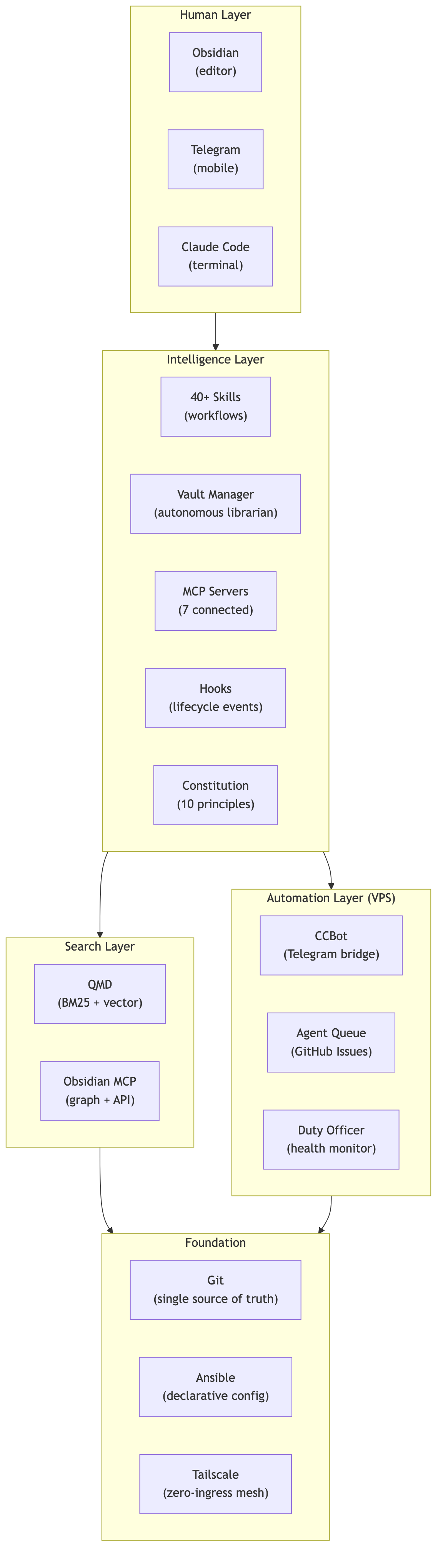
Is it over-engineered? Probably. Okay, definitely. But it runs unattended, recovers from failures, and setting up a new machine takes one command. For a solo knowledge worker building a research program, that trade works.
Thousands of documents, knowledge graph entities, and relations. Background agents have processed hundreds of research tasks. QMD indexes everything in a few seconds (the first run took about 15 minutes). Obsidian MCP traverses the graph on demand.
It's a mess. But it's my mess, and it works.
---
Built with Obsidian, Claude Code, Ansible, QMD, and spite.